Your Personal PC Bodyguard

Your PC is hiding over 200 invisible programs.
Let's find the bad ones.

Speed up your computer, stop hidden malware, and regain complete control with one click. Process Sentinel finds the hidden resource hogs slowing you down—and lets you eradicate them instantly. No technical skills required.
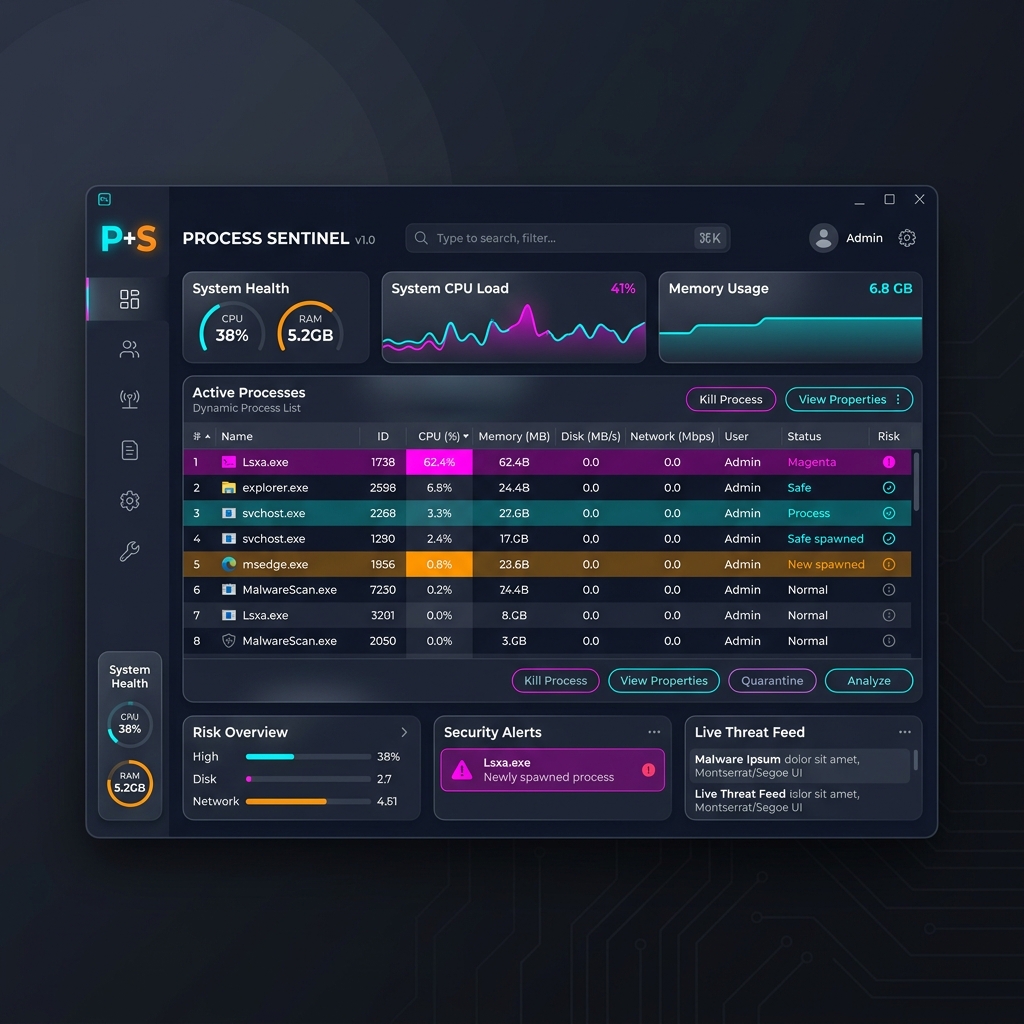
Process Sentinel Dashboard showing live process monitoring with risk overview, security alerts, and threat feed panels

THE SILENT THREAT

Why is your PC suddenly so slow?

Every time you browse the web, update a game, or download a file, new hidden programs sneak onto your system. Over time, they drain your CPU, eat your RAM, and steal your data. You don't need a new computer. You just need to clean the one you have.

Invisible Resource Hogs

Is your laptop fan spinning like a jet engine? Hidden background updaters and broken apps are maxing out your CPU while you aren't looking. We find them instantly.

Hidden Spyware & Miners

Malware disguises itself as normal Windows services. Traditional antivirus programs often miss them. If you don't know what to look for, they stay hidden forever.

Random PC Freezes

Programs with "Memory Leaks" silently consume all your RAM until your entire PC freezes. Sentinel automatically detects and flags apps that won't stop eating memory.

THE MAGIC FIX

Three clicks to a brand new PC.

1

The Healthy Snapshot

Click "Record Baseline" when your PC is running smoothly. Sentinel memorizes this perfect state as your golden standard.

2

The Silent Watchdog

Go about your day. Sentinel acts as a 24/7 bodyguard, instantly sounding the alarm if any new, suspicious program tries to sneak in.

3

The One-Click Fix

See something that shouldn't be there? Ask our AI what it is, slow it down, or completely eradicate it with a single click.

SMART SNAPSHOTS

Stop guessing. Know exactly what changed.

Traditional task managers overwhelm you with hundreds of confusing rows of data. Process Sentinel works differently. By remembering your PC's healthy state, it only shows you the Delta — exactly what changed.

  • Instant Answers: Immediately separate your trusted apps from the unknowns. No more staring at a wall of text.
  • Automatic Threat Highlighting: Anything that appeared while you weren't looking is highlighted in bright red and pushed to the top.
  • Smart Color-Coding: Every program is tagged so you know exactly if it's a NEW threat, an ORPHANED zombie, or perfectly SAFE.
Live Threat Radar
● NEW stealth_miner.exe 99.1% CPU
◆ ORPHAN powershell.exe 12.4% CPU
○ CHILD chrome.exe 0.1% CPU
✓ BASELINE explorer.exe 0.0% CPU

YOUR CYBERSECURITY EXPERT

Is it a virus? Ask AI instantly.

Found something suspicious but afraid to delete it? Sentinel connects to Google's Gemini AI and the global VirusTotal database to give you a plain-English answer in seconds.

  • Plain English Explanations: Click one button and get a human-readable explanation of exactly what a mysterious program does. No jargon.
  • 72 Antivirus Engines: Sentinel checks the file's unique fingerprint against 72+ global antiviruses. If it's malware, you'll know.
  • Zero Guesswork: Stop googling random file names and scrolling through confusing forums. Get the definitive answer right in the dashboard.
AI Analysis Result

Target: WinUpdateService.exe

"WARNING: This is NOT a legitimate Windows service. It is located in a temporary folder and exhibits behavior consistent with a cryptocurrency miner. It is actively using 85% of your GPU. Recommendation: Eradicate immediately."

ABSOLUTE POWER

Freeze it. Quarantine it. Eradicate it.

Sentinel doesn't just show you problems — it gives you the ultimate weapons to fix them. Right-click any process to unleash professional-grade controls with zero technical knowledge.

  • Quarantine Resource Hogs (Gamer Mode): Game lagging? Force background updaters to run on a single CPU core, instantly freeing up 90% of your PC's power.
  • Freeze in Memory: Suspend a suspicious program instantly. It stops running but stays in RAM so you can investigate safely without it escaping.
  • Nuclear Eradication (Kill Tree): Malicious programs often spawn dozens of hidden clones. One click kills them all—children first, then the parent—preventing them from ever coming back.
Freeze Instantly
Enable Gamer Mode
Quarantine File
Nuclear Eradication

THE VERDICT

Why Sentinel is the only tool you need.

Feature Windows Task Manager Premium Antivirus Process Sentinel
Memorizes your healthy PC state
Plain-English AI Explanations
Automatic Memory Leak Detection
"Gamer Mode" CPU QuarantiningPartial
Nuclear Kill-Tree Eradication
Application SizeHeavyBloated (500MB+)Ultra-Light (120 KB)
PriceFree$50 - $100 / YearFree Core / $14.99 Pro

YOUR PRIVACY

100% Private. 100% Local.

Process Sentinel runs entirely on your machine. No accounts to create. No data collection. The core monitoring tools are free forever, and Pro surgical tools are a one-time $14.99 purchase.

No data collection whatsoever
100% local — nothing leaves your machine
Zero installation — runs right from your desktop
Works completely offline

Take back your computer.

Make your PC run like the day you bought it.


Get Process Sentinel Now

Works on Windows 10 & 11. No installation required.